GRID & DCA bots · MetaTrader 5

Automate your gold trading. Keep the risk limits in your hands.

GRID and DCA bots for XAUUSD on your own MT5 account. Pick a preset, set your stop limits, and let it run 24/5. Start on a free $10,000 demo.

Funds stay at your broker · No card needed · Trading involves risk of loss

The My robots screen: a gold chart with a GRID bot and a DCA bot running on the demo account, each with its profit and status
Demo account — simulated, not real results
  • Funds stay at your brokerWe never hold your money
  • Works with MetaTrader 5Your own MT5 account
  • $10,000 free demoNo card, no broker needed
  • Hard limits on every botTotal stop loss & stop prices

Live accounts: Exness through our partner link any MetaTrader 5 broker on the Pro plan

How it works

From sign-up to a running bot in four steps

  1. 1
    Create a free account

    Your $10,000 demo is ready instantly.

  2. 2
    Connect MT5

    Trading access only — your broker keeps your funds.

  3. 3
    Pick a bot & preset

    Conservative, Optimal or Aggressive, or set every parameter yourself.

  4. 4
    Monitor

    Every order and every limit is visible in your dashboard.

Create your free account

Start on demo — no card required.

Have a referral code?

Prefer Google? Sign up with Google · Have an account? Log in

The bots

Two bots, each with a clear job

Know when a bot works — and when it can hurt — before you start it.

GRID Bot

For sideways markets

Works best when
price moves sideways inside a range — it buys dips and sells rallies across a ladder of orders.
Risky when
price breaks out and trends hard in one direction — open positions can pile up. Set a total stop loss before you launch.
Available on
XAUUSD · MetaTrader 5
Start a GRID bot

DCA Bot

For pullbacks that recover

Works best when
price dips and comes back — it adds at set steps to lower the average entry, then closes the whole cycle at your take profit.
Risky when
price keeps moving against you — each safety order is larger than the last, so losses grow quickly. Set a total stop loss and a price limit.
Available on
XAUUSD, EURUSD, GBPUSD, BTCUSD, ETHUSD · MetaTrader 5
Start a DCA bot
Coming soon FluxGrid — a third bot in development. Join the waitlist
Inside the app

See it before you sign up

Real screens from Forex Project, recorded on a demo account.

Start from a preset or tune every parameter.

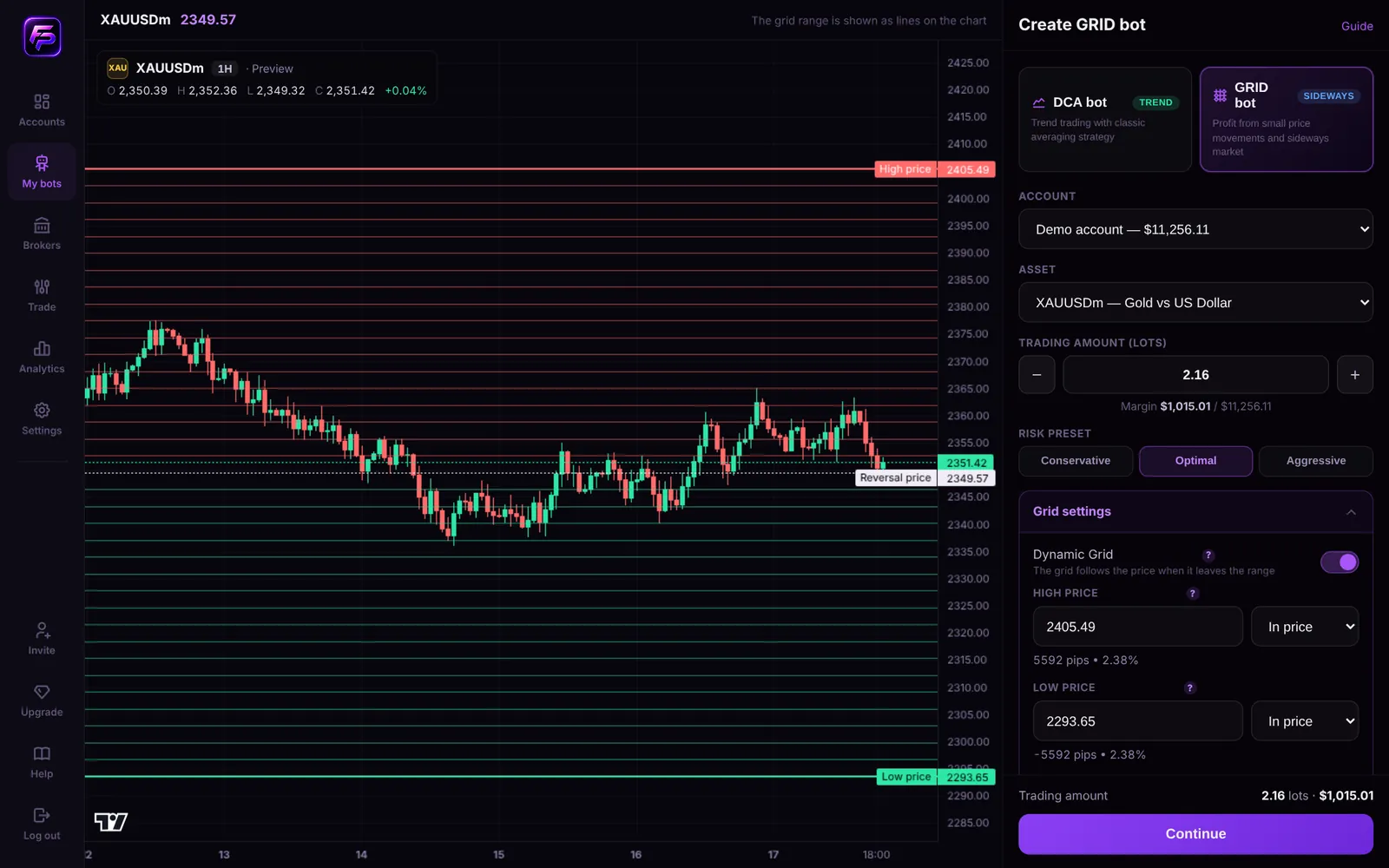
Pick Conservative, Optimal or Aggressive and the range and levels are drawn on the chart before anything is placed.

Create GRID bot screen: gold chart with the high price, reversal price and low price of the grid, and the Conservative, Optimal and Aggressive presets
Demo account — simulated, not real results
Risk, shown openly

Every bot has a bad day. Here's what yours looks like.

GRID and DCA add to positions when price moves against them. In a strong trend that can mean large losses — so every Forex Project bot lets you set a hard stop before it starts.

How a grid loses money in a trend, and where the stop loss ends it Price moves inside the grid range, then breaks below it. The bot keeps buying on the way down, so open positions pile up, until price reaches the total stop loss you set, where the bot closes everything and stops. 1 2 3
  1. Range: price swings inside the grid and the bot takes small profits.
  2. Trend: price breaks out; the bot keeps adding, so open positions pile up.
  3. Your stop: the total stop loss you chose closes everything and stops the bot.

What can go wrong

A strong one-way move carries price out of the grid or past the DCA ladder. Every open position then loses at the same time, and a larger lot size makes it faster.

What the bot does about it

It stops at the limits you set: a total stop loss closes everything; stop prices end the bot if price leaves your zone; Smart Protection pauses new orders around major news.

What you control

Lot size, range, levels or safety orders, take profit, total stop loss and stop prices — all set before the bot starts, and shown on every bot card.

What you get

Tools that keep you in control

Risk presets

Conservative, Optimal and Aggressive set the range, levels and steps for you — and you can change any of them.

Smart Protection

Pauses new orders around high- and medium-impact news, and stays out of the market around its daily close (No-Trade Window).

Hard limits

Total take profit, total stop loss and stop prices close the bot's positions and stop it when they are reached.

Dynamic Grid

When gold leaves the range, the grid moves with it level by level instead of sitting idle.

Funds stay at your broker

We connect for trading only. Deposits and withdrawals stay with your broker.

Full trade history

Every order and result in Analytics, per bot or combined — deleted bots included.

Pricing

Start free. Upgrade when you go live.

Test on the demo for as long as you like. Plans differ in how many accounts and bots you run.

Free

$0/month

Learn the bots on the demo, then run one bot on a live Exness account opened through our partner link.

  • 1 active bot
  • 1 trading account
  • Exness via our partner link
Start free on demo

Basic

$19.99/month

A first live setup with room for a second account.

  • 2 active bots
  • 2 trading accounts
  • Exness via our partner link
Choose Basic
Most popular

Advanced

$39.99/month

Run several bots side by side across accounts.

  • 5 active bots
  • 5 trading accounts
  • Exness via our partner link
Choose Advanced

Pro

$99.99/month

Bring any MT5 broker and run bots at scale.

  • 25 active bots
  • 10 trading accounts
  • Exness + any MT5 broker
Choose Pro
Included in every plan: GRID & DCA botsRisk presetsSmart ProtectionHard stop limits$10,000 demoFull trade history

Prices in USD · Cancel anytime · Taxes may apply · Refund Policy

Coming soon · not available yet

FluxGrid

A bot we are building that switches its behaviour with the market. It is in development; nothing here is live.

  • Grid in a range
  • Flow with a trend
  • Idle when conditions are unclear

One email when it launches. No spam.

FAQ

Questions, answered

What happens if the market trends hard against my bot?
This is the case to plan for. GRID and DCA both add positions as price moves against them, so a strong one-way move is where losses build up. Every bot therefore has a Total Stop Loss and stop prices: when your loss or the price reaches the limit you set, the bot closes its positions and stops. Set them before you launch, and try them on the demo first.
Which markets and platforms are supported right now?
GRID bots trade gold (XAUUSD). DCA bots trade XAUUSD, EURUSD, GBPUSD, BTCUSD and ETHUSD. Live bots run on MetaTrader 5 accounts — Exness through our partner link on every plan, and any MT5 broker on the Pro plan. The demo account needs no broker at all.
What does "trading access" mean — can you withdraw my money?
No. We connect to your MT5 account only to place and manage your bot's orders. Deposits and withdrawals happen in your broker's own client area, which we have no access to. Your money stays at your broker the whole time.
How are my MT5 credentials stored?
Your MT5 password is encrypted (AES-256-GCM) before it is saved and is used only to keep the trading connection to your account. Remove a broker account at any time and its connection is deleted with it.
Do I need trading experience?
You don't need to code or tune every number. Start from a preset — Conservative, Optimal or Aggressive — run it on the demo, and read the bot's limits before you go live. Understanding how GRID and DCA lose money matters more than experience; the risk section above explains it.
Can I test before going live?
Yes. Every account includes a simulated demo with $10,000 of virtual money, priced from live market data. Run as many tests as you like — nothing real is at risk, and you can reset the balance at any time.
Do the bots keep running when my computer is off?
Yes. Bots run on Forex Project's servers whenever the market is open (24 hours a day, five days a week). Check on them or stop them from any browser.
Does Forex Project guarantee profits?
No — and no trading bot can. GRID and DCA bots can lose money, and demo results do not predict live results. Use limits you can afford, and read the risk disclaimer.
Who is behind Forex Project?
Forex Project builds trading-automation software. We are not a broker, we never hold client funds, and we do not give investment advice. You can reach the team at support@forexproject.ai.
Can I cancel or get a refund?
Yes. Cancel a paid plan at any time in Settings; it stays active until the end of the period you paid for. Your first payment can be refunded within 14 days — the Refund Policy has the details.

Try it on demo first. Go live only when you're ready.

$10,000 of virtual money, real market prices, and every limit in your hands.

Risk disclosure. Trading foreign exchange, commodities and CFDs on margin carries a high level of risk and may not be suitable for all investors. The high degree of leverage can work against you as well as for you. Automated strategies such as DCA and GRID increase exposure while a position is losing, and can result in losses exceeding your initial deposit during sustained adverse trends.

Forex Project provides trading automation software only. We are not a broker, we do not hold client funds, and we do not provide investment advice or manage accounts on a discretionary basis. Your funds remain with your chosen broker at all times. Screens shown on this page come from a demo account and are not real or expected results. You are solely responsible for your trading decisions and for complying with the laws of your jurisdiction.